Direct Takeaway / Executive Summary
What proxy speed do I need for automation tools? For Light Automation (social media posting, account monitoring), a proxy response time of 1 – 3 seconds is sufficient. For Medium Automation (data scraping, e-commerce monitoring), you need 0.5 – 1.5 seconds. For Heavy Automation (bulk account creation, sneaker bots, flash sales), response times must be under 0.5 seconds (< 500 ms). Balancing proxy free proxy speed checker with high IP trust scores (like residential or ISP proxy pools) is key to preventing bans while maintaining high task completion rates.
Building scalable automation systems—whether for web scraping, social media management, ad verification, or automated account creation—requires far more than just writing clean Python or Node.js code. The foundation of any reliable automation stack is its network delivery pipeline. Without high-speed, low-latency proxies, even the most sophisticated Puppeteer or Playwright script will suffer from execution timeouts, dropped connections, high block rates, and severe performance bottlenecks.
However, digital marketers, software engineers, and data automation teams often ask: What proxy speed do I really need for automation tools? Is ultra-fast datacenter speed always superior, or does high-speed automation trigger security alarms on modern anti-bot platforms like Cloudflare, Akamai, and PerimeterX?
In this comprehensive guide, we unpack the performance requirements for proxy networks across different automation tiers. We explore key telemetry metrics like Time to First Byte (TTFB), latency, concurrency, and bandwidth overheads, helping you select and fine-tune the perfect proxy pool for your automation stack.
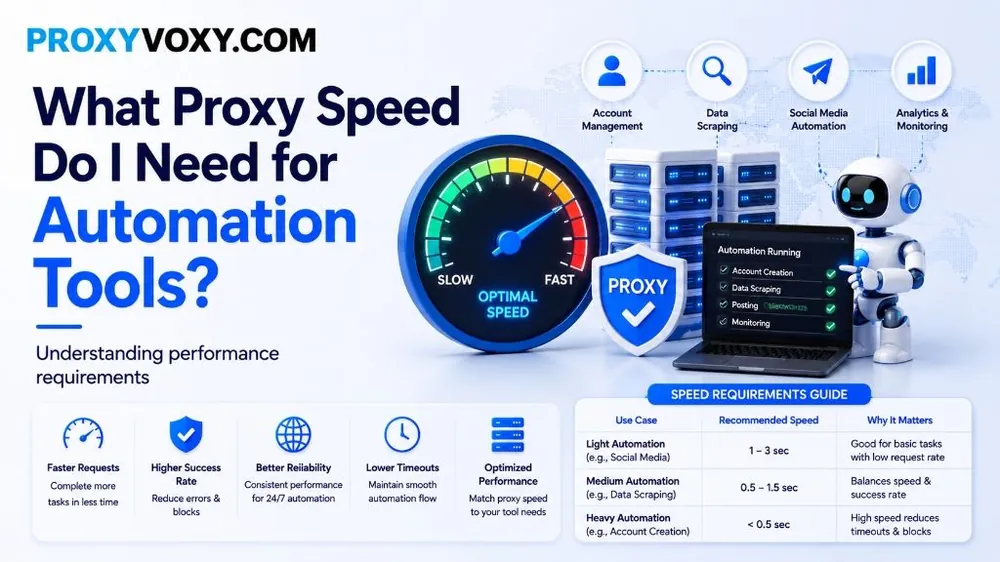
Speed Requirements Guide: Proxy Benchmarks by Use Case
Not all automation tasks require instantaneous response times. Requiring sub-100 millisecond speeds for low-frequency social media updates is unnecessary and expensive, whereas using 3-second proxies for high-concurrency scraping leads to script failure.
The table below provides clear, actionable proxy speed requirements categorized by automation intensity:
| Automation Tier | Typical Use Cases | Recommended Proxy Speed | Key Performance Objective |
|---|---|---|---|
| Light Automation | Social media posting, scheduled account monitoring, profile warming | 1.0 – 3.0 seconds | High account trust, human emulation, low request frequency |
| Medium Automation | Data scraping, price intelligence, SEO tracking, product auditing | 0.5 – 1.5 seconds | High success rate, balanced throughput & moderate anti-bot bypass |
| Heavy Automation | Account creation, sneaker bots, flash sales, high-frequency transactions | < 0.5 seconds (< 500 ms) | Minimal latency, instant connection handshake, low timeouts |
Deconstructing Proxy Speed: Key Performance Metrics
When proxy providers advertise "high speed," what does that actually mean for your code? To evaluate proxy performance accurately, software developers must monitor four fundamental network metrics:
1. Time to First Byte (TTFB)
TTFB measures the exact duration from when your client script sends an HTTP request to when the first byte of data is received back from the target server through the proxy gateway node. For web scraping and automated browser instances, TTFB represents over 70% of total request duration. A proxy with a high TTFB (> 2.5 seconds) causes browser automation scripts to lag, leading to Navigation Timeout Exceeded exceptions in Puppeteer or Playwright.
2. Network Latency & Round-Trip Time (RTT)
Latency is the physical time required for packets to travel across optical fiber or cellular networks between host servers, proxy entry points, proxy exit nodes, and target web servers. Physical distance matters: routing a request from a US-based client to a European proxy exit node to scrape a US target server adds 150ms+ of physical fiber latency per TCP handshake step.
3. Bandwidth Throughput (Mbps / Gbps)
While latency measures speed, bandwidth measures capacity. High-bandwidth proxies (100 Mbps to 1 Gbps per connection thread) are essential when scraping media-rich web pages containing high-resolution images, JavaScript bundles, or video streams. If your proxy throttles bandwidth to 1 Mbps, rendering web pages inside headless Chrome will crash your queue processing speeds.
4. Request Success Rate (%)
Proxy speed is useless if requests end in HTTP 403 Forbidden, 429 Too Many Requests, or 502 Bad Gateway errors. A proxy that completes requests in 200 ms with a 40% success rate is significantly less efficient than a proxy that takes 900 ms with a 99.5% success rate. Real operational speed equals (Successful Requests / Total Time).
Why Does Proxy Speed Matter for Automation?
- Faster Task Completion: Complete thousands of automated worker tasks in minutes rather than hours.
- Higher Success Rates: Fast, stable proxies reduce socket drops, connection resets, and gateway timeouts.
- Better 24/7 Reliability: Maintain continuous, uninterrupted automation streams without job queue backlogs.
- Lower Infrastructure Overhead: Efficient proxy latency means your worker servers spend less time waiting on open sockets, preserving CPU and RAM.
Detailed Analysis: Proxy Speed Requirements by Use Case
1. Light Automation (Social Media & Account Management)
Automating social media actions (posting tweets, warming profiles, checking notifications on Instagram or LinkedIn) mimics organic user activity. Real human beings take several seconds to navigate pages, tap buttons, and read content.
- Recommended Speed: 1.0 – 3.0 seconds
- Optimal Proxy Type: 4G/5G Mobile Proxies or Static Residential IPs
- Why It Matters: Social platforms prioritize IP reputation over speed. A 2-second proxy response time is completely acceptable and safer, because rapid-fire interactions (e.g., liking 50 posts per minute) trigger automated ban triggers regardless of proxy latency.
2. Medium Automation (Web Scraping & Data Extraction)
E-commerce price monitoring, SERP tracking, and real estate data collection require harvesting data across tens of thousands of URLs daily. Speed directly dictates how many data points your infrastructure can process per hour.
- Recommended Speed: 0.5 – 1.5 seconds
- Optimal Proxy Type: Rotating Residential Proxies
- Why It Matters: Rotating residential proxy networks like ProxyVoxy provide access to 90M+ IP addresses. By distributing requests across thousands of concurrent residential nodes, you maintain response times under 1.2 seconds per page while effectively bypassing target rate limits.
3. Heavy Automation (Account Creation, Sneaker Bots, Flash Sales)
In ticket purchasing, sneaker drops, and high-volume account creation, milliseconds determine success or failure. When thousands of users compete for limited inventory, sluggish proxies result in immediate checkout failure.
- Recommended Speed: < 0.5 seconds (< 500 ms)
- Optimal Proxy Type: Datacenter Proxies or Static ISP Proxies
- Why It Matters: Datacenter and Static ISP proxies feature direct optical fiber backbones linked directly to major internet exchange points (IXPs). They eliminate residential Wi-Fi latency, delivering response times as low as 80ms – 300ms.
Datacenter vs. Residential vs. Mobile Proxy Speeds
Different proxy architectures rely on distinct physical network infrastructure. Understanding their architectural differences explains why their speed profiles differ so dramatically:
| Proxy Architecture | Average Latency (TTFB) | Bandwidth Capability | Trust Score / Detection Risk |
|---|---|---|---|
| Datacenter Proxies | 50 ms – 200 ms | Ultra High (10 Gbps+) | Low Trust (Easy to block) |
| Static ISP Proxies | 100 ms – 400 ms | High (1 Gbps) | High Trust (Residential ASN) |
| Rotating Residential | 500 ms – 1500 ms | Moderate (10 - 100 Mbps) | Very High Trust (Real Home Routers) |
| 4G/5G Mobile Proxies | 800 ms – 2500 ms | Variable (Cellular Tower) | Highest Trust (CGNAT Protected) |
The Speed vs. Detection Paradox: Why Blazing Speed Isn't Always Better
A common trap for developers building automation tools is assuming that faster is always better. In high-speed scraping, sending 100 HTTP requests per second through a sub-50ms proxy to a single target server will immediately trigger rate limiters (HTTP 429) or IP bans.
Modern anti-bot solutions evaluate request cadence velocity. Real human users take time to scroll, render CSS, and trigger JavaScript events. To maximize automation success:
- Introduce Randomized Jitter: Add random sleep delays between requests (e.g.,
await sleep(Math.random() * 1000 + 500)). - Leverage IP Pool Rotation: Instead of throttling single-IP speed, use ProxyVoxy's rotating residential pool. Spread 1,000 requests across 1,000 unique residential IPs concurrently. Each individual IP makes only 1 request, maintaining maximum speed while keeping individual IP request rates well below detection thresholds.
- Use Connection Keep-Alive: Reuse TCP connection handshakes across requests to cut unnecessary DNS lookup delays.
How to Test and Benchmark Your Proxy Speed
You can easily write a simple Python benchmark script using time.perf_counter() to measure your proxy pool's actual TTFB and request handling speed:
import requests
import time

proxy_url = "http://username:password@gate.proxyvoxy.com:8000"
proxies = {"http": proxy_url, "https": proxy_url}
target_url = "https://httpbin.org/ip"

latencies = []

for i in range(10):
    start_time = time.perf_counter()
    try:
        response = requests.get(target_url, proxies=proxies, timeout=5)
        end_time = time.perf_counter()
        ttfb = (end_time - start_time) * 1000
        latencies.append(ttfb)
        print(f"Request {i+1}: Status {response.status_code} | TTFB: {ttfb:.2f} ms")
    except Exception as e:
        print(f"Request {i+1} Failed: {e}")

if latencies:
    avg_speed = sum(latencies) / len(latencies)
    print(f"
Average Proxy TTFB: {avg_speed:.2f} ms")
Summary & Final Recommendation
Matching your proxy speed to your automation workload is critical for optimizing bot performance, saving bandwidth costs, and preventing IP bans:
- Choose Rotating Residential Proxies for data scraping, market research, and web crawling where broad IP coverage and 0.5s – 1.5s response times deliver optimal success.
- Choose Static ISP Proxies for fast, sustained sessions requiring sub-500ms speed combined with residential trust.
- Choose Mobile Proxies for social account automation where maximum IP trust overrides latency considerations.